7.4 Using CBA ItemBuilder Items with TAO (using Portable Custom Interactions)

Tests in QTI-compatible platforms such as TAO are defined as a sequence of QTI items. Each QTI item contains one or more QTI interactions. QTI interactions can be Common Interactions, Inline Interactions, Graphical Interactions, or (Portable) Custom Interactions (PCI). If TAO is used as the assessment platform, then QTI items can be created, managed, and edited directly in TAO. For use cases where assessment content cannot be implemented with QTI interactions, (Portable) Custom Interactions (PCI) can be integrated.84
7.4.1 Prepare CBA ItemBuilder Project Files for fastib2pci-Converter
For item authors without experience in software development or if existing assessment content is already available, the CBA ItemBuilder can be used as authoring tool for Portable Custom Interactions (PCI), for instance, to create Technology-Enhanced Items (see section 2.3) that can be used in TAO. Portable Custom Interactions that can be used in QTI-items can be created using either a single or a linear sequence of multiple CBA ItemBuilder Project Files.
To create a Portable Custom Interactions with CBA ItemBuilder Project Files, the fastib2pci can be used. It allows creating Portable Custom Interactions with either single or multiple Project Files. As a necessary prerequisite, one or multiple Tasks must be defined within each Project Files. If multiple Project Files are used, an alphabetical order is used. The same applies to the order of Tasks, if within one CBA ItemBuilder Project File multiple Tasks are defined.
7.4.2 Generating PCI-Components using fastib2pci-Converter
The converter fastib2pci is provided as a Github project template that contains a so-called CI/CD worker (i.e., Github actions). Using the converter requires an account at github.com. After creating an account and log-in to your profile, navigate to the repository fastib2pci and push the button ‘Use this template’ as shown in Figure 7.2.
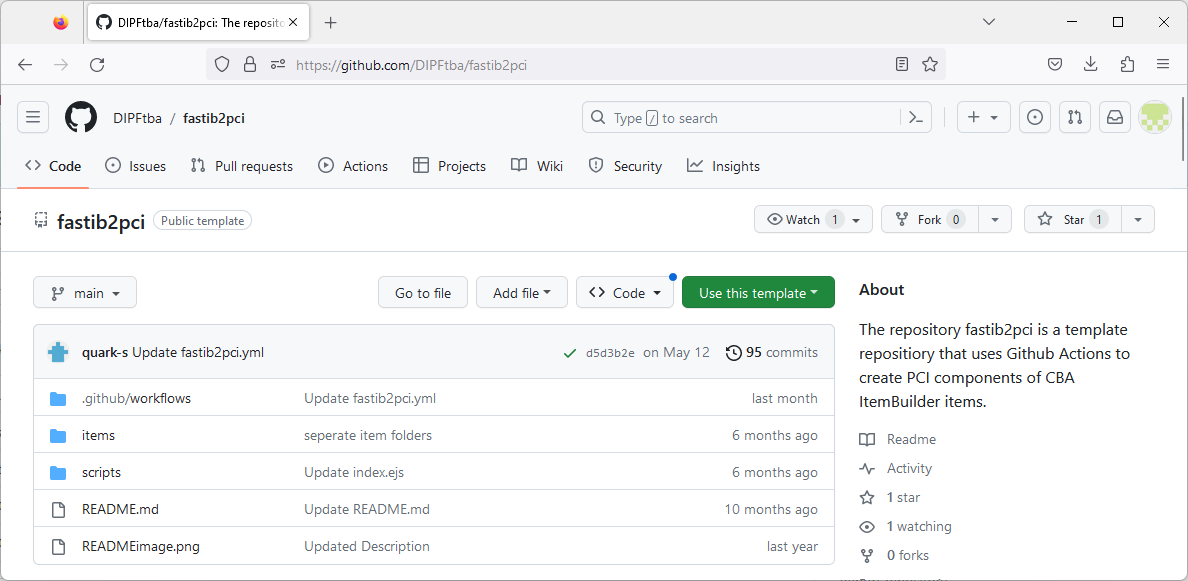
FIGURE 7.2: Repository fastib2pci shows the button Use this template after log-in to github.com.
Provide a new project name and make sure to select Include all branches.85 As soon as the project is created, the CI/CD worker included in the template repository fastib2pci will create the PCI components using the example CBA ItemBuilder Project Files included in the folder items. After the worker completed, the PCI components can be downloaded from the repository in the section Releases (or using the following link: https://github.com/{your github account name}/{repository name}/releases).
To use the converter with your own CBA ItemBuilder Project Files, create a new directory (e.g., component_1), upload CBA ItemBuilder Project Files to the new directory, and delete the example directories ‘test_1’ and ‘test_2’. After committing the files, the CI/CD worker will automatically update the PCI components and provide them in the section Releases. Note that you can use a git-client (see section 8.3.2.2) to work with the repository.
7.4.3 Flavors of PCI-Components Created by fastib2pci-Converter
For each sub folder of the directory items/ one *.Tar-file (tarball archive)86 is generated. Accordingly, if you plan to use multiple PCI-components for a particular assessment, only one git-repository is required.
The *.Tar-files generated by the fastib2pci-converter contain different versions of the PCI-components, using the identical CBA ItemBuilder Project Files in the repositories items/-folder. There are two reasons to create different flavors:
IMS PCI vs. TAO PCI: The implementation of PCI support in TAO changed over the last years from a TAO-specific implementation (TAO PCI) towards the standard specification (IMS PCI). Both versions are generated by the fastib2pci-converter.
Generic vs. Specific: CBA ItemBuilder content is embedded using PCI-components using iframes. All resources used in CBA ItemBuilder Project Files are embedded in the generated Specific PCI-components (required to make the Portable). However, since TAO might have, depending on the configuration, a size limitation, the fastib2pci-converter also creates a Generic version that only includes the CBA ItemBuilder runtime in the PCI-component (resulting in very small file sizes of about 150 KB), referring to static GitHub Pages for hosting the actual item content.
fastib2pci-converter, github pages must be enabled.87
If GitHub Pages are activated in the project (see Figure 7.3), the CI/CD worker worker will automatically prepare the hosting for the item content as required for the Generic PCI-components.
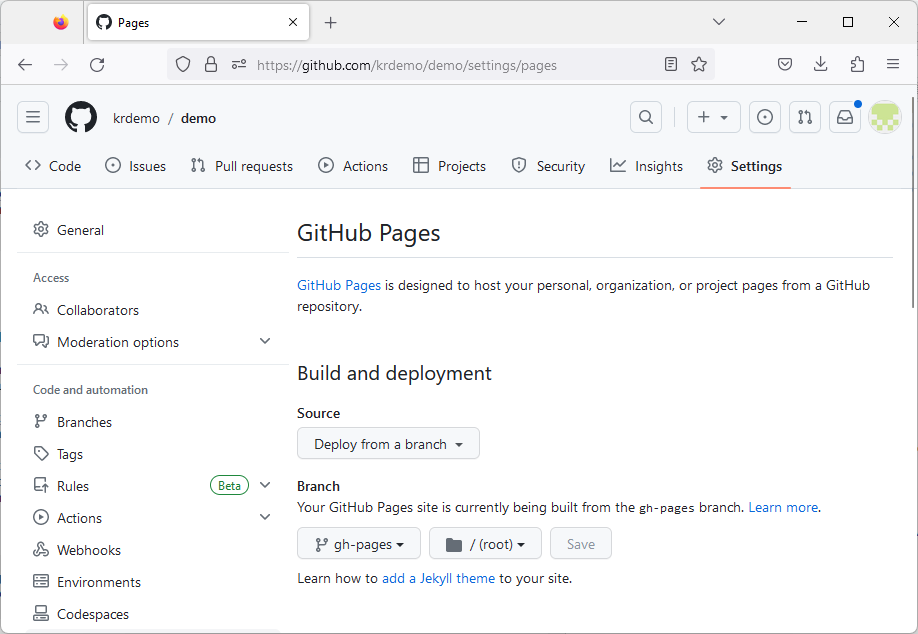
FIGURE 7.3: Example repository settings showing activated GitHub Pages.
https://{your github account name}.github.io/{repository name}/{sub directory name}/
If, for item protection reasons, the content can not be freely accessible, then using the Generic PCI components requires providing a (secured) static hosting of the content in the Branch gh-pages, generated by the fastib2pci-converter. This effort is not required for the Specific PCI components.
7.4.4 Side Note: Archive Assessment Content using GitHub Static Pages
For various reasons, it can sometimes be reasonable to provide assessment content statically (i.e. without data storage). In addition to screenshots, CBA ItemBuilder tasks, for example, can also be displayed as interactive web pages. With the converter fastib2pci this can be easily realized if you have your GitHub Pages activated in your account (either using public repositories or a GitHub Pro plan). See the public GitHub Pages for the template repository fastib2pci as an example: https://dipftba.github.io/fastib2pci/
Note that examples and environments such as the QTI-PCI development environment can be helpful for software developers when implementing Portable Custom Interactions.↩︎
Note that you can select Public or Private for your new project.↩︎
Note that
*.Tar-files are archive file that can be extracted, for instance, using 7-Zip on Windows computers.↩︎Currently this option is available for either using public repositories or for GitHub Pro plans.↩︎