5.1 Terminology, Concepts and User Interface

The core component for the definition of the automatic scoring is the design of syntax conditions, which can be evaluated based on inputs (i.e., Component State of elements) and operators (i.e., incorporating the states in the internal finite-state machine(s) and the visited pages).
User Defined Id’s: The link between components and the syntax is provided by the User Defined Id's. Using the main menu Project > Edit all user defined IDs all named components of a CBA ItemBuilder Project File can be displayed. As shown in Figure 5.1, for a simple multiple-choice item, various components of type Checkbox can be defined, all of them with a unique UserDefinedId.
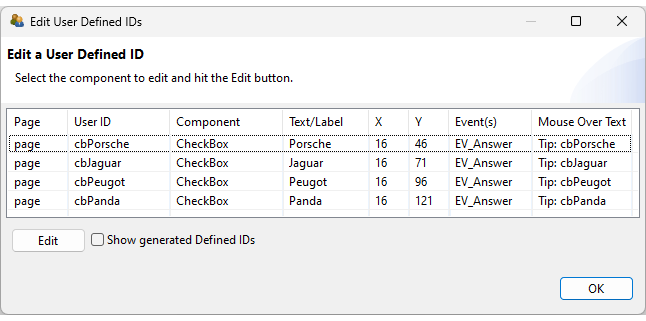
FIGURE 5.1: UserDefinedIds defined for example item shown in Figure 5.2.
Figure 5.2 shows a simple item to illustrate the scoring of a multiple-choice item. The item was created by adding a HTMLTextField (see subsection 3.8.2 for the instruction and the four Checkboxes (see subsection 3.9.3). A simple scoring of this item might distinguish the conditions Correct (Jaguar and Panda) and Wrong (Jaguar and Panda are not selected or additional wrong options are selected). If a test-taker never selected any Checkbox at all, this might be called a Missing response (see section 5.3.11 for details).
The CBA ItemBuilder allows to define scoring-conditions using these UserDefinedIds. The conditions are labeled of Hits (i.e., Hit-conditions) and Misses (i.e., Mis-conditions) combining UserDefinedIds of components, and additional functional operators (see appendix B.2 for all operators), if necessary, combined with logical operators. Each condition represents a nominal conditions that is to be differentiated when computing the value of a scoring variable (called Class). The item contains one Task (defined in the Task-Editor, see subsection 3.6. The Task-Editor is also used to define the scoring (see Figure 5.3).
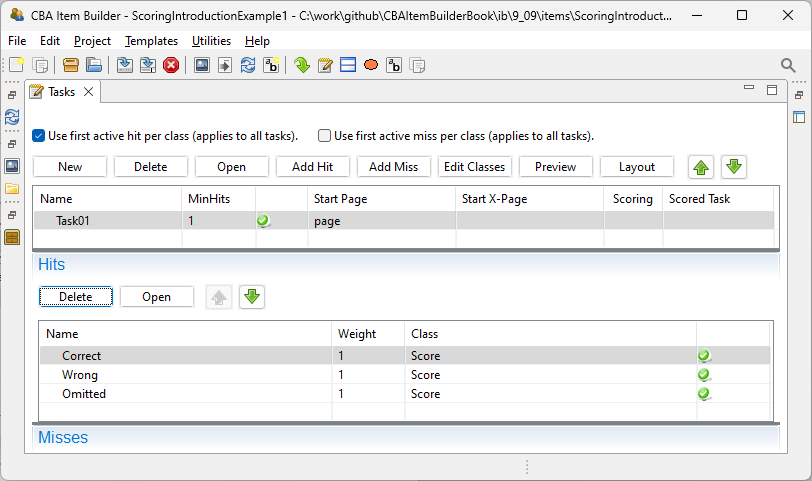
FIGURE 5.3: Task-Editor with one Task and three Hit-conditions for the item shown in Figure 5.2.
Class: Scoring is defined using nominal Hit-conditions. Each conditions corresponds to a potential value of a variable. To specify the relationship of values to variables, Hit-conditions (i.e., values) are assigned to Classes (i.e., Classes are equivalent to Variables in the final data set), as shown in Figure 5.4. The variable Score can have the three potential values Correct, Wrong and Omitted.
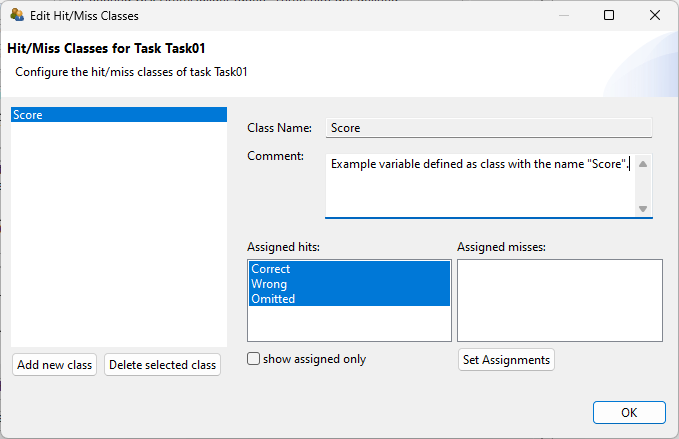
FIGURE 5.4: Class Definition Dialog for the item shown in Figure 5.2.
Name: Each hit- and miss-condition requires a unique name, that is defined in the Task-Editor (shown in Figure 5.3). This name represents the nominal value of the variable, if the corresponding condition is met (i.e., if the hit is active).
Condition Syntax: Each Hit-condition is defined by providing a scoring syntax. The example item shown in Figure 5.2 contains three different Hit, and the syntax for the conditions are shown in the editor for Conditions in Figure 5.5. The first condition for the hit Correct combines the User Defined Id's of the four Checkboxes with logical operators (using the CBA ItemBuilder specific bracketing of expressions, see section 4.1.3).
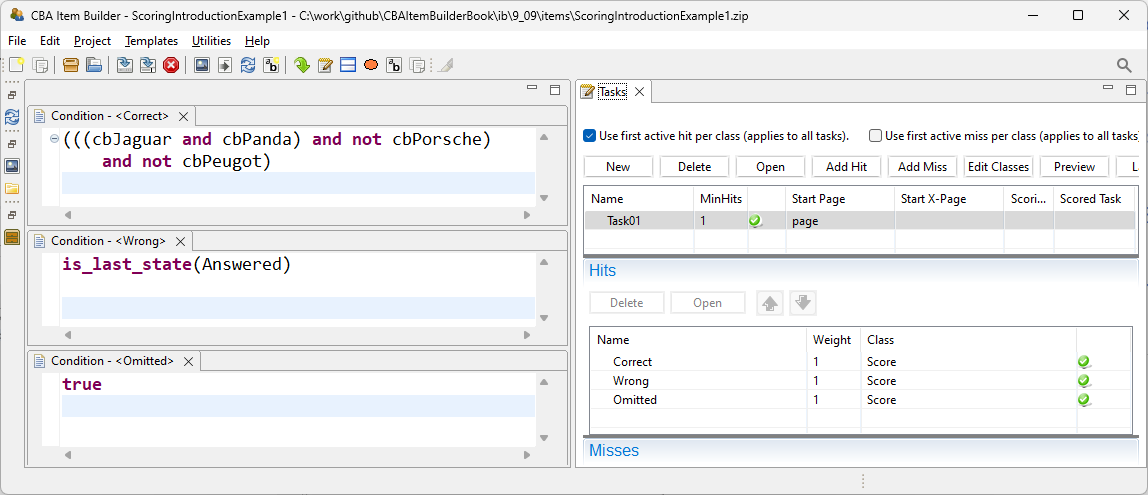
FIGURE 5.5: Condition Syntax for the Hit-condition Correct of the item shown in Figure 5.2.
However, the syntax for scoring rules (see section 5.3) also allows using scoring operators, for instance, to incorporate information from the dynamic part of CBA ItemBuilder tasks. Operators are illustrated in Figure 5.5 in the syntax for the hit-condition for Wrong, which evaluates to true if the item’s current state is Answered. Note that the state Answered is implemented using a simple finite-state machine (see section 4.4 for details).
Use first active hit per class (applies to all tasks). (see right part of Figure 5.5).
Scoring Debug Window: The Scoring Debug Window (already introduced in section 1.5) can be used to explore the scoring of the example item shown in Figure 5.2, as shown in Figure 5.6. The Scoring Debug Window can be requested during item development in the Preview and is also available in the examples embedded in the online version of this book.
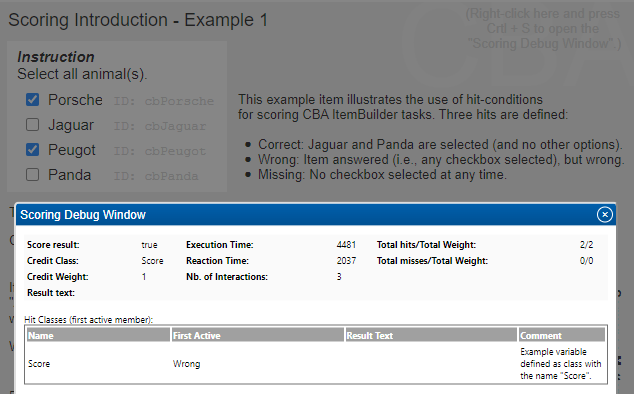
FIGURE 5.6: Screenshot of the Scoring Debug Window in a preview of the item shown in Figure 5.2.
Multiple Classes: If components are to be used only in a particular way to form outcome variables, defining scoring constraints may be more onerous than strictly necessary (see section 5.2 for an alternative). The full potential of CBA ItemBuilder scoring unfolds in the use cases when different summaries of answers to variables are to be used. This is illustrated in Figure 5.7 for a simple Likert-style item. Assume that two variables should be created: One variable containing the response (Class: Response) and one indicating agreement or disagreement [Class: Style, as used, for instance, in models to investigate response style; cf. Böckenholt and Meiser (2017) and others].
By introducing the layer of hit definitions (described in detail in section 5.3), the CBA ItemBuilder allows the creation of flexible scoring for responses that can combine multiple components and can result in multiple variables (i.e., classes). Use cases not only include questionnaires (as the example in Figure 5.7) but can also be found for cognitive assessment, e.g., when both the raw response and the automatically scored response (correct vs. incorrect) are to be stored or when dichotomous and polytomous scoring is to be considered. Use cases for explicit scoring with multiple classes also arise if, for example, time measures are included in the scoring of responses.
Result-Text: Hit- and miss-conditions can be used to define evidence in terms of categorical values, which can then be assigned to classes to be used as outcome variables. However, also entered text and numbers are required as result variables. To copy text responses to result variables, the CBA ItemBuilder provides the result_text()-operator. The underlying idea is that each class (i.e., variable) can provide a Result-Text in addition to the name of the active hit. The condition defines which particular value is used as Result-Text. The (first) active hit-/miss-condition of a class defines which text is copied into the Result-Text.
The item shown in Figure 5.8 illustrates the use of the Result-Text. The first class (Var1) is used for question 1: Class Var1 has only one hit-condition with the syntax result_text(input1). This condition is always true, and whatever is entered in the SingleLineInputField with the User-Defined Id input1 is copied to the Result-Text for Var1. For question 2, the class Var2 is used with two hit conditions. When a text is entered into the InputField with the User-Defined Id input2 (i.e., the text is not empty checked with the condition matches(input2,"")), the value is copied to the Result-Text using the operator result_text(input2) in the condition Q2_Text. When nothing is entered, the Result-Text is filled with the string Missing (see hit-condition Q2_Missing). The class Var3 is used for question 3. The class contains either the selected option (A or B) in the Result-Text (see hit-conditions Q3_A and Q3_B). If neither A, B or Other is selected, the string Missing is copied to the * Result-Text* (see hit-condition Q3_Missing). Two hit-conditions are defined that deal with conditions that Other is selected. If no text is entered into the SingleLineInputField with the User-Defined Id input3, the text Other: Not Specified is copied to the Result-Text (see hit-condition Q3_OtherNotSpecified). If a text is entered, the Result-Text is filled with the string Other: followed by the provided text. This is achieved by using an argument list for the result_text()-operator (see 4.1.5). Note that Var3 will not contain the text entered into input3 if A or B is selected. This issue is addressed by defining Var4 that contains the text entered in input3, even if Other is not selected.