6.4 FSM and Conditional Link Syntax Examples

6.4.1 Create Animated Instructions
In order to achieve a higher degree of standardization of assessments, e.g. if it is not ensured that all target persons can or want to read fluently, instructions are often read aloud. For this requirement the CBA ItemBuilder allows the use of components for the playback of audio files or videos (see section 3.10.3). The following example in Figure 6.12 illustrates how mp3 files are played back one after. The playback for each audio file one.mp3, two.mp3 and three.mp3 is started in a transition between two states and the transitions are triggered by either the button (one.mp3) or the audio Stop Event (see subsection 4.4.3) linked to the Audio component used to playback the preceding audio file.
Multiple events (see subsection 4.4.3) are used to create the example shown in Figure 6.12:
Events: EV_AudioOneFinished, EV_AudioTwoFinished,   /* Audio Stop Events */
        EV_AudioThreeFinished
        EV_Start, EV_Reset;                         /* Start and Reset */
The three audio stop events are used to trigger the transitions between the states One, Two and Three, the two additional events EV_Start and EV_Reset are used to start the instruction and to reset the illustration. Note that in real assessments the instruction would like be implemented to start automatically (using, for instance, the property Automatic Start of the first Audio component, see section 3.10.3 for details).
The remaining finite-state machine rules (simplified) are shown in the following listing:
// First transition starts automatically
Rules: Start -> NotStarted {true|setFrozen(B_Next)}

// Triggered by button 'Start'
NotStarted => One {EV_Start|setMediaPlayer(A_One, mp_start),
                            setFrozen(B_Start)}

// Triggered by the audio end event of audio one, two, or three:
One => Two{EV_AudioOneFinished|setMediaPlayer(A_Two, mp_start)}
Two => Three{EV_AudioTwoFinished|setMediaPlayer(A_Three, mp_start)}
Three => InstructionFinished{EV_AudioThreeFinished|unsetFrozen(B_Next)}

 // Reset (the illustration) triggered by button `Reset`
InstructionFinished => NotStarted{EV_Reset|setFrozen(B_Next),
                                           unsetFrozen(B_Start)}
6.4.2 Adaptivity Within Tasks using Conditional Links
Adaptive testing based on item response theory requires a scaled item pool. If assessments are not performed with the goal of IRT-based ability estimation using already known item parameters, skip rules using conditional links can also be used to implement explicitly specified branching.
The item in Figure 6.13 shows an example where tasks are presented following a predefined branching tree (see Figure 6.14) depending on the solution of previous tasks.
In this hypothetical example, the assessment is done separately in two sections. In a first learning phase, additional pages are displayed after each incorrect answer, which could contain explanations or motivational feedback, for example. These additional pages are not displayed if a task has already been solved correctly. In the second measurement phase, no feedback provided, but the difficulty of the administered task take still previous responses into account.
FIGURE 6.14: Adaptivity in the with-task adaptivity example shown in Figure 6.13.
The following tasks are used in the example, adminsitrated according to the logic shown in Figure 6.14:
Question 1: What fraction of the square is blue?
 (A: \(\frac{4}{3}\), B: \(\frac{5}{8}\), C: \(\frac{3}{8}\), D: \(\frac{7}{3}\), E*: \(\frac{1}{2}\))
Instruction 1: Some useful hint how to count the number of highlighted areas in a figure, using the plot of Question 1 as an example.
Question 2: What fraction of the square is red?
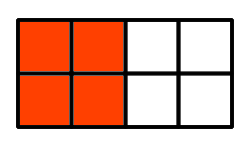 (A: \(\frac{1}{2}\), B: \(\frac{2}{3}\), C: \(\frac{4}{9}\), D*: \(\frac{5}{9}\), E: \(\frac{1}{5}\))
Instruction 2: Some useful hint how to count the number of highlighted areas in a figure, using the plot of Question 2 as an example.
Question 3: What is the denominator of the fraction \(\frac{12}{25}\) (Short text: \(25\))
Question 4: What is the numerator of the fraction \(\frac{7}{8}\) (Short text: \(7\))
Instruction 3: Some useful hint how the two components of a fraction are labeled (i.e., \(\text{Fraction}=\frac{\text{Numerator}}{\text{Denominator}}\)).
Question 5: Express \(3\div 5\) as a fraction (A: \(\frac{5}{3}\), B*: \(\frac{3}{5}\), C: \(15\))
Question 6: What fraction of one kilogram are 3 grams? (A: \(\frac{3}{10}\), B: \(\frac{3}{100}\), C*: \(\frac{3}{1000}\), D: \(\frac{3}{10000}\),E: \(3\))
Question 7: How do we write two-thirds? (A: \(\frac{3}{2}\), B*: \(\frac{2}{3}\), C: \(\frac{1}{3}\), D: \(\frac{1}{2}\))
Question 8: What fraction are 2 months of one year? (A: \(2\), B: \(\frac{1}{12}\), C*: \(\frac{1}{6}\), D: \(\frac{2}{10}\), E: \(\frac{1}{2}\))
Question 9: What is the number that makes these fractions equal? \(\frac{2}{?}=\frac{4}{12}\) (A: \(4\), B*: \(6\), C: \(8\), D: \(3\), E: \(10\))
In this example, forcing answers has been omitted and missing answers are treated as incorrect.
6.4.4 Approaches to Show Additional Content
Figure 6.16 illustrates different options to show additional information on request of test-takers. Example 1 displays additional information using a page configured as Dialog Page, linked to a button. The Dialog Page is configured as Closable: false and positioned using the X and Y coordinate of the Frame. The information is hided using a button defined with the command CLOSE that is placed on the Dialog Page. Example 2 uses a MapBasedVariableDisplay to show either a question mark or a text depending on the value of a variable, and the value of the variable is changed using the Finite-State Machine and an event assigned to the MapBasedVariableDisplay.
Example 3 also uses events. The page shown in a PageArea is changed when the test-taker clicks into the SingleLineInputField using an event linked as Raised In Event and an empty page is shown in the PageArea when the Raised Out Event is triggered. Example 4 makes additional information visible using the unsetHidden()-operator, linked to the Raised Events of RadioButtons.
6.4.5 Implement Time Limits for Tasks
Limiting the available time for test parts in which test-takers may be able to navigate freely can be provided by the test delivery software. However, time limits are also doable within assessment components. In multi-page CBA ItemBuilder projects, time limits can be implemented with timed FSM events (see section 4.4.3). Figure 6.17 illustrates how a time limit can be implemented for multiple tasks. The example also uses PageAreas (see section 3.5.4) to implement a permanently visible outer page in which the time-limited tasks on sub-pages are embedded.
To understand the example in Figure 6.17, it is crucial to see that the timed event EV_Timelimit only results in a timeout within the ST_Started state:
Events: EV_Start,                  // Start time restricted section
        EV_Timelimit 10,               // Timed event (10 seconds)
        EV_Task1, EV_Task2, EV_Task3;  // Events for navigation

Rules: ST_Start->ST_NotStarted{true}

ST_NotStarted => ST_Started{EV_Start|setEmbeddedPage(PA,task1)}

ST_Started internal {EV_Task1|setEmbeddedPage(PA,task1)}
                    {EV_Task2|setEmbeddedPage(PA,task2)}
                    {EV_Task3|setEmbeddedPage(PA,task3)}

ST_Started => ST_Timeout{EV_Timelimit|setEmbeddedPage(PA,timeout)}

ST_Timeout => ST_NotStarted {EV_Start|setEmbeddedPage(PA,instruction)}
This desired behavior is achieved by defining a rule for the event EV_Timelimit only in the FSM state ST_Started.
6.4.7 Video with Built In Questions
Inspired by the Interactive Video format from H5P, the following example shows how a video can be used split into multiple parts to combine the presentation of multimedia content and opportunities for interaction. Figure 6.19 illustrates how segments of a video can be shown, interrupted with questions.
6.4.8 Click-Sensitive Labels
For RadioButtons (and Checkboxes) the label texts should be click-sensitive. That means, a click on the text next to a radio button or checkbox should select the corresponding element. This ensures that RadioButtons and Checkboxes are not only activated when the test-taker hits exactly the (small) control. As shown in the following example (A), this is the default behavior if the label text (i.e., the distractor text) is defined using the text property of the RadioButton (or Checkbox). If the text property is not used, a click on the additional component (for instance, an HTMLTextField or a SingleLineInputField with Readonly=true showing the distractor text) is not linked to the RadioButton (or Checkbox, see B). In this case, it is suggested to use the advanced features of the CBA ItemBuilder to make the components used to show the distractor text click-sensitive. This goal can be achieved with the CBA ItemBuilder using syntax operators either as part of Conditional Links (see section 4.3) or in transitions of a Finite-State Machine (see section 4.4).
Solution Using Conditional Links: A first and simple solution based on Conditional Links is shown in Figure 6.20. The example item illustrates the expected behavior (A) if the text property of RadioButtons is used. The item also shows the problem of labels that are not click-sensitive (B). To use of Conditional Links as additional click-sensitive labels for RadioButtons (C) the labels were designed using SingleLineInputFields with the property Readonly=true:
FIGURE 6.20: Example for using operators in Conditional Links to align SingleLineInputFields and RadioButtons (html|ib).
As can be seen, when clicking on the text label for the different distractors for option C, each click on the text automatically activates the corresponding RadioButton. This behavior is implemented by assigning Conditional Links to each SingleLineInputField, as shown in the following example:
The target page of the Conditional Link is the current Simple Page (with the name page). The Boolean value true is defined as the condition, meaning that this particular condition will always be executed. Next to the pipe symbol, the operator setActiv(UserDefinedID) (see Appendix B.2 for details) is used to set the RadioButton with the User-Defined-ID rb1 active (i.e., selecting the RadioButton and thereby, as the default behavior of components of type RadioButton de-selecting all other RadioButtons in this particular RadioButtonGroup).
Solution Using Finite-State Machine: A second more general solution uses the Finite-State Machine to align the RadioButton selection and clicks on the components used as labels.67 The example looks identical to Figure 6.20, but components of type HTMLTextField are used as labels. The reason is, that HTMLTextFields allow to assign FSM Events (see section 4.4.3).68 To implement option C with a Finite-State Machine, one FSM Event must be defined for each response option (i.e., for each RadioButton). These events can then be used in a particular state, to activate the RadioButton (or Checkbox) using the setActive-operator (see Appendix B.2 for details), for instance, in an internal transition as shown in the following FSM syntax:
Events: EV_RB1, EV_RB2, EV_RB3, EV_RB4;     // One event for each RadioButton,
                                            // triggered by the HTMLTextFields
Rules: Start -> Running {true}
Running internal {EV_RB1 | setActive(rb1)}  // The setActive-operator is used
     {EV_RB2 | setActive(rb2)}                // to change the selected RadioButton,
     {EV_RB3 | setActive(rb3)}                // when the event that is linked to
     {EV_RB4 | setActive(rb4)}                // the HTMLTextField's is triggered.
Both approaches also work to create click-sensitive labels for other components such as Checkbox (see section 3.9.3). The choice between the two options is mostly a matter of taste. However, some components can only be linked with Conditional Links and other components only allow linking with FSM Events.
6.4.9 Contextualized Multiple-Choice Items
Figure 6.21 shows how components of type ImageValueDisplays and the Finite-State Machine can be used to contextualize a multiple choice answer format. In the example, the shown items shall be striked through.
The visual design of the response format is created with ImageValueDisplays so that for each single choice an ImageValueDisplay shows either the selected or the un-selected option. Each ImageValueDisplays triggers one of the events EV_Item01, EV_Item02, EV_Item03, or EV_Item04 and the following FSM is used to change the values of the variables:
Events: EV_Item01, EV_Item02, EV_Item03, EV_Item04;  // Events for the options

Rules: Start -> Running {true|set(V_Item01,1),  // Initiallize the value of
                      set(V_Item02,1),          // variables, used to store the
                      set(V_Item03,1),          // selected state for each option
                      set(V_Item04,1)}          // (1:=deselected, 2:=selected)
Running internal
   {EV_Item01 : [V_Item01 == 1] | set(V_Item01,2)}   // Conditional internal
   {EV_Item01 : [V_Item01 == 2] | set(V_Item01,1)}   // rules for switching
   {EV_Item02 : [V_Item02 == 1] | set(V_Item02,2)}   // between selected and
   {EV_Item02 : [V_Item02 == 2] | set(V_Item02,1)}   // deselected state for
   {EV_Item03 : [V_Item03 == 1] | set(V_Item03,2)}   // each option.
   {EV_Item03 : [V_Item03 == 2] | set(V_Item03,1)}
   {EV_Item04 : [V_Item04 == 1] | set(V_Item04,2)}
   {EV_Item04 : [V_Item04 == 2] | set(V_Item04,1)}
Use of the responses given by clicks on components of type ImageValueDisplays (stored internally in the variables V_Item01, V_Item02, etc.) for scoring the task is possible using the variable_in()-operator (see section 5.3.5).
6.4.10 Shuffle Response Options using ValueMaps
The CBA ItemBuilder does not explicitly support the representation of answer alternatives in random order (shuffling). However, the functionality can be implemented using MapBasedVariableDisplays and ValueMaps as shown in Figure 6.22.
In addition to MapBasedVariableDisplays, the example uses an invisible component of type ExternalPageFrame to generate the random numbers in JavaScript. The random numbers are requested from the Finite-State Machine with the callExternalPageFrame()-operator (see section 4.6.5), calling a JavaScript code to set the variable values. Since the ExternalPageFrame is not yet loaded at the time of loading the item, initializing the variable values is triggered by calling the FSM event EV_Shuffle from the ExternalPageFrame as soon as it is loaded and ready.
The example can be found in the file ComponentsAsLabelsForRadioButtonsFSMExample.zip.↩︎
Note that
HTMLTextFieldcould also be used with Conditional Links (see section 3.11.3).↩︎