4.1 Syntax Overview

To implement dynamic item contents, the CBA ItemBuilder provides editors for various forms of text-based syntax. The different syntax types are designed in such a way that no specific programming knowledge is required and the different editors support editing and correcting syntax. Hence, although the ItemBuilder is primarily a graphical tool, some advanced features require the use of simple syntax expressions. Apart from the basic similarity of syntax variants, there are specific operators and syntax rules, which are described in the corresponding sub-sections:
- Task Initialization (i.e., syntax-based configuration of Tasks, see section 4.5)
- Finite-State Machines (i.e., internal logic layer of the CBA ItemBuilder capable to change behavior and visual presentation of items, see section 4.4)
- Conditional Links (i.e., links that change the link target according to conditions, see section 4.3)
Syntax will also be used in the next chapter to combine information from the response (e.g., component states from input components such as RadioButtons, CheckBoxes, SingleLineInputFields, etc.) and probably the response process (e.g., visited pages, occurred states, values of variables, etc.) to outcomes:
- Scoring (i.e., the definition of hits conditions using a scoring syntax, see chapter 5)
The graphical user interface allows the definition of the visible elements assessment components such as items and instruction pages. However, computer-based assessments’ full potential can only be realized with the CBA ItemBuilder by using the syntax components.
4.1.1 Basic Syntax Elements
The various definitions, which are made in the CBA ItemBuilder using a syntax that is easy to learn, are based on common design principles.
UserDefinedIds: To refer to components that have been created and placed in the Page Editor in the Drawing Area, the UserDefineId is always used (see section 3.7.4). Since these identifiers must always be unique within a CBA ItemBuilder Project File, each component can be referenced by the string that was defined as UserDefinedId. UserDefineIds can be used to name components or to query or evaluate the state of components.
If components can occur multiple times within a task, for instance, because a PageArea can be included multiple times (see section 3.5.4), the UserDefinedId of the container in which components are nested used must be included (see section 4.1.4).
Operators: In addition to the UserDefineIds, predefined keywords also form the syntax provided by the CBA ItemBuilder. These keywords mark Operators that can be used to apply changes to components or to perform more specific evaluations of component states in scoring conditions. Operators follow a common scheme: name(arguments). The operators are distinguished by their name and the different operators can have arguments, but do not have to. The meaning of the arguments is determined thereby over the order and defined for each operator. Arguments are specified in quotation marks if they are strings. Multiple operators can be listed, depending on the context, using spaces (Conditional Links, see section 4.3.3; Task Initialization rules, see section 4.5), commas (Actions in finite-state machine rules, see section 4.4.6) or combined by logical expressions (Scoring Conditions, see section 5.3.2).
Auto-Completion: A useful helper for syntax creation is auto-completion. To enable this feature, press Ctrl + Space (Strg + Space) in a syntax editor of the CBA ItemBuilder. Available operators and existing UserDefinedIds are then displayed and selected by pressing Enter.
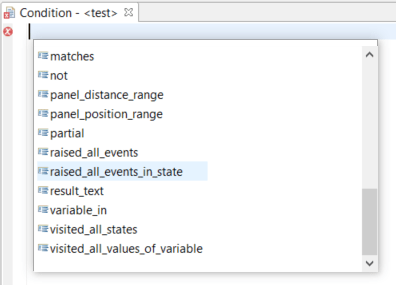
FIGURE 4.3: Screenshot of the Auto-Completion feature in syntax editors.
Auto-completion is available in the editor for creating conditional links (see section 4.3), in the editor for defining state machine events and rules (see section 4.4), in the editor for defining the task-initialization (see section 4.5), and in the editor for scoring rules (i.e., Hit- / Miss-conditions, see section 5.3).
With a small red icon, errors within syntax definitions are automatically detected and displayed.
4.1.2 Comments
In all syntax flavors Comments can be defined to document and describe purpose of particular part of the syntax. To mark a line as a comment in a syntax, add two slashes left to the text that should be treated as comment (e.g., (...) // My Comment ). Everything in the remaining line of a syntax right to the // will be ignored.
Multiple lines can be commented by starting either each line with // or using the syntax /* Comment (that can multi-line text) */. Everything between /* and */ is ignored as interpreted as comment, even if it spans multiple lines.
4.1.3 Logical Expressions and Bracketing
The CBA ItemBuilder syntax is not a complex programming language and requires only to learn few keywords (mainly, the so-called operators, see 4.4.6). However, three crucial points must be acknowledged to use the CBA ItemBuilder syntax capabilities efficiently, as described in the following.
Case Sensitive: All syntax statements are case-sensitive. This applies to UserDefinedIds (see section 3.7.4), to the operators (see section 4.4.6), the keywords Events: and Rules which are used to structure the Finite-State Machine syntax, and the Logical Expressions. Use the Auto-Completion (see section 4.1.1) to avoid invalid syntax due to wrong capitalization.
Logical Expressions: The CBA ItemBuilder can logically link or negate statements in the different syntax variants, e.g., logical conjunction (and), logical disjunction (or) and logical negation (not). For the formulation of logical expressions, the keywords true and false are additionally available. For example, if true is specified as a condition, this condition is always fulfilled.
Bracketing: Logical expressions in the syntax of the CBA ItemBuilder must always be formulated in such a way that not more than two expressions occur within one pair of brackets. For more than two statements, this requires nesting the statements, as illustrated with the following examples:
- Logical conjunction of two conditions:
( Condition1 and Condition2 ) - Logical disjunction of two conditions:
( Condition1 or Condition2 ) - Logical negation of a condition:
not Condition - Logical conjunction of three conditions:
( ( Condition1 and Condition2 ) and Condition3 )- Can be considered as two conjunction
A: ( Condition1 and Condition2 ),B: Condition3,
- combined to
( A and B ).
- Can be considered as two conjunction
- Logical negation of a conjunction of three conditions:
not ( ( Condition1 and Condition2 ) and Condition3 )- Can be considered as two conjunction
A: ( Condition1 and Condition2 ),B: Condition3, - combined to
C: ( A and B ), and - negate as
not C.
- Can be considered as two conjunction
- Logical negation of a conjunction of three conditions (two with negation):
not ( ( Condition1 and not Condition2 ) and not Condition3 )
The CBA ItemBuilder has a built-in syntax checker that identifies errors with small icons and mouse-over texts. Writing syntax in several lines and using comments can help write maintainable valid syntax for complex statements.
4.1.4 UserDefinedIds of Nested Pages in Syntax
Special rules apply, if pages are nested. For instance, if components of the type PageArea are used for the design of pages, then the components defined on the embedded page can appear several times within a Task because using the same embedded page multiple times is possible. This means that the UserDefinedId is defined for the embedded page are no longer sufficient to uniquely identify a particular component. However, each PageArea itself has its own UserDefinedId. In order to be able to use components on nested pages such as PageAreas in the syntax of the CBA ItemBuilder, the UserDefinedId of the container (i.e., the PageArea) must be used as a prefix:
PageAreas must be specified in the form UserDefinedId_of_the Container.UserDefinedId_of_the_Component.
The syntax editor does not check if a component is on a page referenced by a PageArea. Ignoring this rule is a common source of errors for conditions and operators in conditional links (see section 4.3.4), finite-state machine operators (see section 4.4.6), and scoring (see section 5.3.9).
4.1.5 Argument Indices
At selected points in the syntax, the CBA ItemBuilder allows so-called argument indices. For example, the operator trace_text(Argument), which can be used to insert a text into the trace log of the CBAItemBuilder, can be used with an argument list (see section 4.4.6). If only a string argument is used, for instance, the string My custom log information can be inserted into the log data:
If an argument index is used in the first string argument with the syntax %{Index}$s, values of variables can be inserted into the created log entry. With this syntax any number of additional values can be inserted into the first string argument, based on an index starting with 1. In the following example, the values of the Variables (see section 4.2) myVar1 and myVar2 are used:
trace_text("My custom log with value %1$s for variable myVar1 and
            value %2$s for variable myVar2", myVar1, myVar2)
When this operator is called, and assuming the values 10 for myVar1 and 5 for variable myVar2, the following text would be added to the trace log: "My custom log with value 10 for variable myVar1 and value 5 for variable myVar2"
Argument lists can be used for the trace_text()-operator (see section 4.4.6 for an example) and for the result_text()-operator (see section 5.3.10 for an example).