3.14 Embedding HTML Content
3.14.1 Component ExternalPageFrame
The CBA ItemBuilder allows the inclusion of HTML content in pages using the ExternalPageFrame-component. There are two options provided how HTML content can be included. Either, the HTML page and all used resources (e.g. images, audio/video files, CSS style sheets and JavaScript files) are added to the item project as embedded resources (Local). In this case, the CBA ItemBuilder items are delivered as internal resources. Embedded resources can also be used, for example, in an offline delivery (see section 7.2.2). Or the external contents are only integrated via a URL (External). In this case, it is necessary that the embedded resources are available at runtime and can be loaded from the browser via the Web. ExternalPageFrames can be defined to be transparent.
Components of type ExternalPageFrame can be selected from the palette as described above (3.7) and added to a container, e.g. a Panel. Size and position of embedded HTML content can be defined in the visual designer (see 3.7.1). The HTML content is assigned to the component via the context menu using the entry Set Page Address (see Figure 3.151).
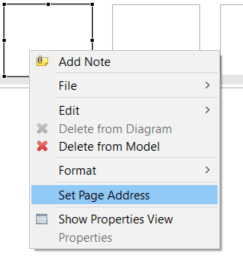
FIGURE 3.151: Context menu of ExternalPageFrame-components.
The dialog Set the URL allows specifying from which URL the content for this component is provided (see Figure 3.152). A Local URL can be defined if the content is provided as part of the item (included using the Embedded HTML Explorer), or the content references an External URL that needs to be accessible at runtime (see section 7.2.2).
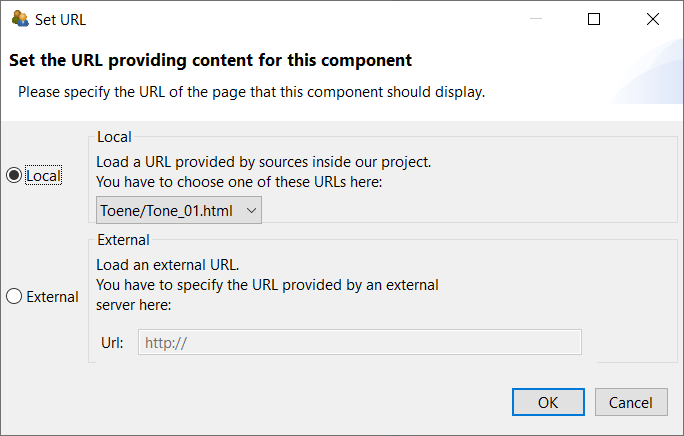
FIGURE 3.152: Dialog Set URL to configure ExternalPageFrames.
Regardless of the source from which the embedded HTML content is obtained at runtime, it is possible to exchange information between the embedded HTML content and the item. This is described in section 4.6.3. In the design view of the CBA ItemBuilder, the embedded HTML content is not displayed, that is, it will be visible only when previewing the item (see 1.4).
3.14.2 Using the Embedded HTML Explorer
To manage the local resources (i.e., the content in static files53 that can be delivered with the item project), the CBA ItemBuilder provides the Embedded HTML Explorer. The HTML Explorer provides all necessary functions to add files as external-resources, organize them into folders, delete them, rename them and export them from the item project, if necessary (see context menu, shown in Figure 3.153).
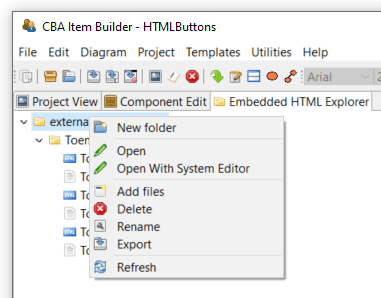
FIGURE 3.153: Context menu of the Embedded HTML Explorer.
To display the content of an HTML, CSS or JavaScript file, the entry Open or Open With System Editor can be selected. The screenshot in Figure 3.154 shows an HTML file opened in the HTML Explorer of the CBA ItemBuilder.
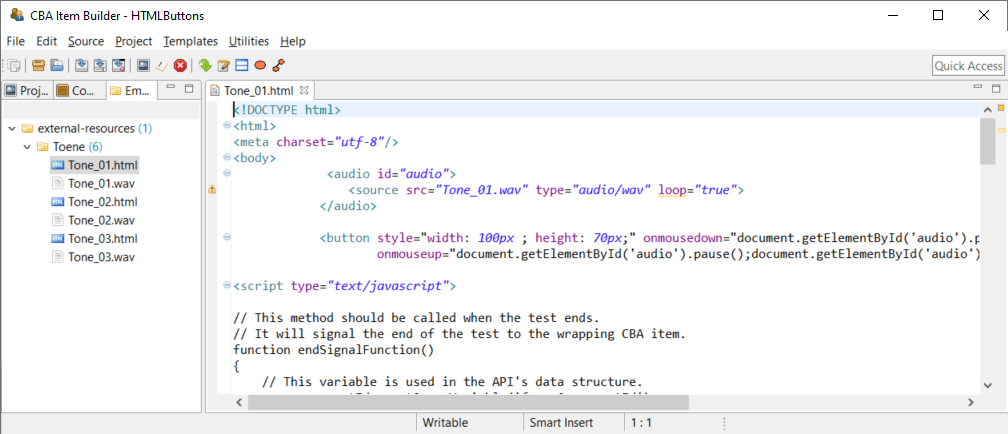
FIGURE 3.154: HTML document opened in an HTML Editor.
A warning is displayed if you try to open a file that cannot be opened in HTML Explorer (see Figure 3.155).
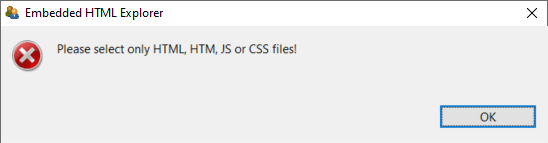
FIGURE 3.155: Warning shown by the Embedded HTML Explorer.
ExternalPageFrames as HTML and JavaScript cannot be used for long-term storage and archiving of items and must be tested independently of the browsers supported by the CBA ItemBuilder.
Caution Note about the use of HTML5 and JavaScript in ExternalPageFrames: As described in section 2.11.2, the CBA ItemBuilder separates the assessment content and the technical implementation required for rendering the items. This separation is impossible when assessment content is only embedded with ExternalPageFrames. Accordingly, it is not possible to adjust the display of items by updating the CBA ItemBuilder, for example, if functionality can no longer be used in new browsers or errors are detected in the embedded content. Due to this restriction, the use of HTML5 and JavaScript in ExternalPageFrames is suggested only in scenarios where resources to update or modify the embedded content are available at the time when items are created and as long as the items are planned to be used or maintained (see also the list of pros and cons in section 4.6.1).
Pros and Cons of Embedded HTML Content: The use of embedded content can offer significant advantages, as it allows to implement item formats, dynamic behavior and interactivity within CBA ItemBuilder items of any kind, including the use of advance libraries, web assembly code and more. However, this huge flexibility also comes with limitations. Pros and Cons are briefly summarized in the following list:
Pro:
ExternalPageFramescan link to HTML content distributed with the CBA ItemBuilder project file and to content included in online deliveries directly from external sources. If, for example, content can only be included by external links for legal reasons, theExternalPageFrameis essential. Of course, if content is only integrated via URL, the delivery must be online and allow access to online resources. If the content embedded asExternalPageFrameis part of the CBA ItemBuilder project file, it will be deployed using the directoryexternal-resources(similar to the resources used by the item, deployed using the directoryresourcesof the project file).Pro: Parts and components that are difficult or impossible to implement with the objects and techniques of the CBA ItemBuilder can be quickly taken over from existing Web applications or easily programmed in HTML5 (i.e., with HTML and JavaScript). The possibility of including and integrating content as
ExternalPageFramewithin CBA ItemBuilder projects is therefore responsible for this tool’s flexibility, extensibility, and openness.Pro: If assessment components already exist as HTML programs and do not require long-term maintenance, integrating these components as
ExternalPageFrameis useful to enable the reuse of existing content. If more complex ideas are to be tried and tested, rapid prototyping practices can also be implemented usingExternalPageFrames.Con: Assessment content created with the pre-built components of the CBA ItemBuilder automatically provides log events (see section 2.8). If external content is only embedded in assessments using
ExternalPageFrames, the programming of the external content must independently capture necessary log events and integrate them into the log data of the test delivery using the provided interface (see section 4.6.3).Con: Content that is to be used via ExternalPageFrames in CBA ItemBuilder project files must be tested with regard to its display in all planned browsers (cross-browser testing, see section 8.4.1).
Con: The assessment components created with the CBA ItemBuilder are currently executed in HTML environments. From the model defined by item authors (see section 2.11.2), a JSON configuration is generated for execution in the browser, which can be executed and displayed by a JavaScript runtime. This JSON configuration is updated by opening a project file of an older version of the CBA ItemBuilder in the latest version. Older contents (in the form of CBA ItemBuilder project files) then profit from possible further developments and error corrections, e.g., with regard to the requirements of modern browsers. This process forms the basis of the migration strategy (see section 3.2.1 and also section 8.7.3) and does not apply to content inserted directly as HTML / JavaScript via the
ExternalPageFrames.Con: From the perspective of a tool for creating computer-based assessments by item authors, probably the most significant challenge for the long-term use of components as embedded HTML resources is the care and maintenance of these components. Depending on the integrated components’ complexity, questions of knowledge management, and documentation of the source code may become necessary or relevant.
By default the CBA ItemBuilder supports Text files (.htm, .html, .css, .scss, .less, .js, .txt, .json), Images (.gif, .jpg, .jpeg, _min.png, .bmp) and Media Files* (.mp3, .flv, .mp4, .webm, .ogv, .ogg, *.wav) as external ressources.↩︎