6.6 ExternalPageFrame Examples

The functionality of the CBA ItemBuilder does not limit the possibilities for designing Technology-Enhanced Items. Instead, the CBA ItemBuilder can be understood as a platform where recurring elements are made available as components for item authors while new and innovative components provided by software developers can be integrated using ExternalPageFrames. For the complete workflow for creating custom HTML5/JavaScript content—including an HTML template, the JavaScript API reference, and integration patterns—see section 4.6. The following subsections provide practical examples that illustrate the range of possibilities.
6.6.2 Alternative Editors as ExternalPageFrame
The CBA ItemBuilder does not natively support the input of mathematical formulas. The following example in Figure 6.26 illustrates the use of the mathlive library. Mathlive provides a virtual keyboard that also allows formula input on touch devices. The library can be included and used via an ExternalPageFrame component.
In the same way as a specific editor for mathematical input, a text editor can also be included as an ExternalPageFrame, as shown in Figure 6.27.
Displaying the number of words already written (or the number of words remaining, if specified) and, for example, detailed JavaScript-based logging of keystrokes is also possible with an ExternalPageFrame, as illustrated in Figure 6.28.
6.6.3 Adding Speech Recognition using ExternalPageFrame
Speech recognition functions can also be embedded in ExternalPageFrames. A generic variant that should work in many browsers and delivery options is illustrated in Figure 6.29.
Offline: The following item shows an offline capable speech recognition. For this, a large language model must be loaded before spoken language can then be translated into characters without transferring the data to the server. For this example, the model of one language is loaded, i.e. the speech recognition in the CBA ItemBuilder item in Figure 6.29 recognizes only German speech.
Online: As an alternative to client-side recognition, some browsers also provide access to server-side speech recognition. The following example in Figure 6.30 will only work in the Chrome browser and requires an internet connection:
6.6.4 Showing HTML5 Package (H5P) using ExternalPageFrame
Using the MIT licensed H5P standalone player it is possible to embed HTML5 Package (H5P) into CBA ItemBuilder projects as interactive content. The following example shows how to display H5P content without using a web server inside the CBA ItemBuilder using ExternalPageFrames (for more details, open ExternalPageFrameH5PIntegrationExample.zip in the CBA ItemBuilder):
FIGURE 6.32: Example for the integration of H5P content in an ExternalPageFrame.
Note: An integration of data storage and xAPI needs to be added.
6.6.5 Including GeoGebra Applets using ExternalPageFrame
Using ExternalPageFrames it is also possible to integrate other interactive content such as GeoGebra applets into CBA ItemBuilder tasks (see figure 6.33, for more details, open ExternalPageFrameWithGeoGebra.zip in the CBA ItemBuilder).
6.6.6 Including QTI Item Content using ExternalPageFrame
With the help of JavaScript (client-side) rendering of content in the IMS Question & Test Interoperability (QTI) format, using, for instance the MIT licensed QTI.js library, QTI can be used within CBA ItemBuilder items (see Figure 6.3471).
6.6.7 Including SurveyJS Questionnaires using ExternalPageFrame
The creation of long surveys with the CBA ItemBuilder is possible but can be more complex than known from survey tools. An easy way to integrate surveys in all delivery modes supported by CBA ItemBuilder (online, offline) is offered by the SurveyJS library.
As shown in the following screenshot (see Figure 6.36), the runtime environment of SurveyJS can be inserted into the Embedded HTML Explorer. The JSON configuration of the survey can be stored in the file index.html, which is used as the Local page address in the ExternalPageFrame. This file is part of the CBA ItemBuilder project files and is available at runtime.
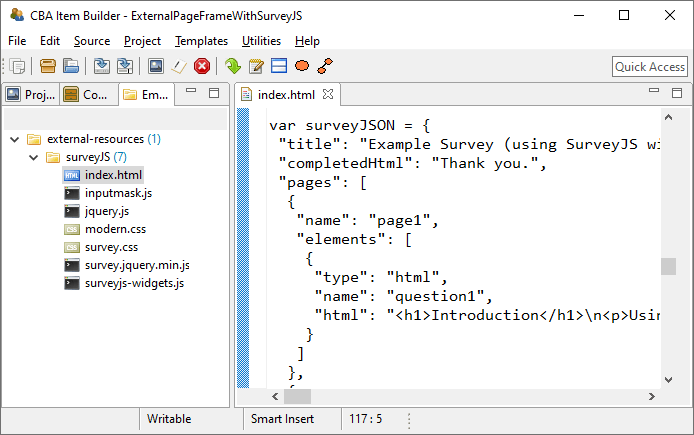
FIGURE 6.36: Screenshot of the Embedded HTML Explorer using SurveyJS conent.
The JSON configuration can be assigned, for instance, to a JavaScript variable surveyJSON:
var surveyJSON = <!-- COPY JSON OR JSON STRING HERE--> ;

function sendDataToServer(survey) {
    postLogEvent("SurveyJS results changed to: " + JSON.stringify(survey.data));
    postFsmEvent('EV_NextTask');
}

function doOnCurrentPageChanged(survey) {
    postLogEvent("Page changed to: " + survey.currentPageNo);
}

function doOnValueChanged (sender, options) {
    postLogEvent("Answer changed to: " + options.name + " ; " + JSON.stringify(options.value));
};

var survey = new Survey.Model(surveyJSON);
$("#surveyContainer").Survey({model: survey, onComplete: sendDataToServer});
$("#surveyContainer").Survey({model: survey, onCurrentPageChanged: doOnCurrentPageChanged});
$("#surveyContainer").Survey({model: survey, onValueChanged: doOnValueChanged});
Two further details of the integration are worth mentioning (see ExternalPageFrameWithSurveyJS.zip):
In order that the administration of the CBA ItemBuilder tasks can be continued after the completion of the survey with the integrated SurveyJS, a function is bound to the
onCompleteevent of SurveyJS. In this functionsendDataToServerthe answers are passed as JSON String into the log data of the ItemBuilder delivery. After storing the answers, an FSM-event is triggered in order to call, for instance, theNEXT_TASK-command.In addition, the
onCurrentPageChangedandonValueChangedevents are also used by SurveyJS. With their help, the collection of log events is possible that indicate the loading of a page (onCurrentPageChanged), and that identifies a change in response. These two pieces of information are necessary in order to extract response times at item-level for detailed analyses (Kroehne and Goldhammer 2018).
Note that a deeper integration of the data storage might be developed in future.
References
The example does not include data storage, that can be added, for instance, using
postMessagesto send data to the CBA ItemBuilder trace data↩︎